
.png)
.png)
.png)
.png)



 Home > frequently > Win 11 related issues - Epson Product FAQ - Epson China
Win 11 related issues - Epson Product FAQ - Epson China
1、 Unable to reinstall via USB connection after uninstalling the driver program
2、 Unable to access the printer's storage device
3、 The 'Image' button on Epson Scan does not display.
4、 The driver installation program cannot exit normally.
5、 Epson software updater cannot update printer firmware via USB connection.
6、 When using USB to print multiple printers of the same model in sequence, there may be a situation where printing is not possible.
7、 EpsonScan software crashes when starting in certain environments of Win11.
Fault phenomenon:
1. Install the driver program through USB connection.
2. After uninstalling the driver program.
3. At this time, it is not possible to reinstall the driver through USB connection.
Reason for the problem:
Microsoft system error.
Affected model:
all printers
Solution:
Option 1: You can reinstall the driver by connecting it with a network cable.
Option 2: When reinstalling the driver, please manually allocate a port other than USB to create the printer queue. After reinstalling the driver, change the port settings to the original USB port
Fault phenomenon:
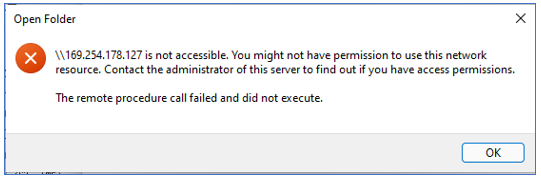
When using a PC to access the storage devices inside the printer, the system prompts an error message indicating unauthorized access, and the printer's storage devices cannot be accessed normally,
Command example: In the "Run" dialog box, enter "\ \ Printer's IP address \" or "\ \ Printer name \", and the error message is as follows:
Solution:
Include 'memorycard' or 'usbstore' in the path when accessing the printer's storage device.
Printer IP address \ memorycard
The IP address of the printer \ usbstore
\ \ Printer Name \ memorycard
\ \ Printer Name \ usbstore "
Reason for the problem:
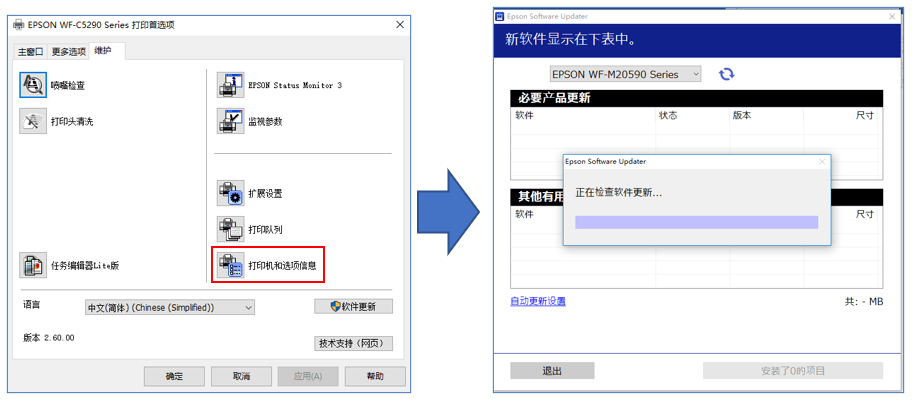
Find the installed printer driver, right-click on preferences → Maintenance → Software Update, and start Epson software updater
Note: This software is used to update printer drivers, firmware, and Epson related software.
Use the latest printer driver on the official website
1. Install the driver program through USB connection (printer A).
2. Disconnect printer A.
3. Connect printer B. Unable to print properly.